Animation Toolkit (2026): The Tools & Software You Need

TL;DR
Choosing the right animation software is about building a smoother workflow from concept to final delivery.
Beginners benefit most from accessible and affordable tools, like Blender, Krita, and Pencil2D. While professional studios rely on advanced animation pipelines using Maya, Houdini, Toon Boom Harmony, and Flow Production Tracking.
2D and 3D productions require different toolsets, especially for rigging, rendering, and compositing.
Animation workflow software is essential for collaboration, approvals, and project tracking.
Freelancers and smaller teams should prioritise flexibility and all-in-one workflows to reduce software overload and bottlenecks.
Animation in 2026 moves faster than ever, and the right tools can make all the difference. Whether you’re freelancing, working in a studio, or creating your first short film, the tools now go beyond drawing and modelling, helping teams streamline workflows, speed up production, and collaborate more effectively.
But with so many options available, finding the right animation toolkit can feel overwhelming. No pressure to master all at once; we have rounded up the best animation software and tools for 2D animation, 3D production, rendering, compositing, and animation workflow management, including both free and paid options for beginners and professionals alike.
Table of Contents
This guide breaks down some of the best animation software and tools available in 2026, organised by category, so you can quickly find what suits your workflow. Whether you're a student building your first toolkit, a freelance animator exploring new options, or a studio professional looking to refine your pipeline, you'll find recommendations for every stage of the animation process.
#1. 7 Drawing & Illustration Software

The right animation software, whether for beginners or professionals, helps you stay consistent as you work. With built-in tools for precision and easy adjustments, you can refine your drawings smoothly without interrupting your workflow.
Adobe Photoshop
Best for: Professional illustration and asset editing
Adobe Photoshop remains one of the most versatile tools for concept art, matte painting, texture work, and detailed visual editing within animation pipelines.
Clip Studio Paint
Best for: Frame-by-frame animation and character art
Widely used by illustrators and animators alike, Clip Studio Paint offers powerful drawing tools with excellent support for comics, storyboarding, and 2D animation workflows.
Krita
Best for: Free digital painting and animation
Krita is one of the best free animation tools for beginners looking to explore digital painting and lightweight animation without subscription costs.
Procreate
Best for: Mobile illustration workflows
Known for its intuitive interface and responsive drawing experience, Procreate is ideal for sketching, ideation, and portable creative workflows.
Affinity Designer
Best for: Vector and raster workflows
Affinity Designer combines vector and raster capabilities in one application, making it useful for flexible asset creation and illustration work.
Corel Painter
Best for: Traditional painting simulation
Corel Painter is designed for artists who want realistic brush behaviour and traditional-style painting experiences in a digital environment.
Sketchbook
Best for: Quick concept sketching
Simple and lightweight, Sketchbook is a great starting point for beginner animators building their visual vocabulary. Sketchbook is ideal for rough concepts, ideation, and fast visual development.
#2. 7 2D Animation Software

The best 2D animation tools streamline the animation process, making it easier to create smooth visuals and build engaging sequences. They help you work faster and with greater control.
Adobe Animate
Best for: Interactive and web animation
Adobe Animate remains a strong choice for creating interactive content, social animation, explainer videos, and lightweight motion graphics.
Toon Boom Harmony
Best for: Professional studio productions
Toon Boom Harmony continues to be an industry standard for professional 2D animation thanks to its advanced rigging systems, compositing tools, and scalable production workflows.
TVPaint Animation
Best for: Traditional frame-by-frame animation
TVPaint is popular among animators who prefer organic, hand-drawn workflows with detailed bitmap-based animation tools.
OpenToonz
Best for: Free studio-style workflows
Originally developed for production environments, OpenToonz offers surprisingly advanced animation capabilities for independent creators and small teams.
Pencil2D
Best for: Beginners learning animation fundamentals
Pencil2D is a lightweight and easy-to-use 2D animation tool designed for traditional frame-by-frame animation. Its simple interface allows beginners to focus on core principles without being overwhelmed by complex features.
Synfig Studio
Best for: Vector-based animation
Synfig Studio is a 2D animation software that focuses on vector-based workflows. You can create smooth motion without relying heavily on frame-by-frame drawing. It uses automated tweening and interpolation to generate in-between frames, which speeds up the animation process.
Jitter
Best for: Motion design and social content
Jitter is a browser-based motion design tool designed for creating quick, polished animations for UI, social media, and marketing content. It simplifies the animation process with ready-made templates and intuitive controls, making it especially useful for fast-turnaround projects.
#3. 6 3D Animation Software

3D animation software powers everything from character animation and visual effects to game development and cinematic productions.
The best 3D animation tools in 2026 combine modelling, rigging, simulation, lighting, and rendering into efficient production pipelines.
Blender
Best for: All-in-one 3D workflows
Blender is one of the best free 3D animation tools thanks to its comprehensive feature set covering modelling, rigging, sculpting, animation, rendering, and compositing.
Autodesk Maya
Best for: Professional character animation
Autodesk Maya is an industry-standard 3D software widely used in film, television, and game production for high-end character animation and rigging. It offers powerful tools for creating complex rigs, realistic movement, and detailed simulations, making it a core part of many professional animation pipelines.
Houdini
Best for: Simulations and VFX
Houdini is a powerful 3D animation software known for its procedural workflow, allowing artists to create complex simulations and visual effects with a high level of control and flexibility. While it also supports keyframe animation and motion capture, its strength lies in building dynamic, data-driven effects that can be easily adjusted and reused throughout production.
Cinema 4D
Best for: Motion graphics
Cinema 4D is a user-friendly tool, ideal for three-dimensional motion graphics. This tool handles dynamic visuals, titles, and animated sequences with relative ease compared to more complex 3D software.
Autodesk 3ds Max
Best for: Architectural visualisation and games
Autodesk 3ds Max is a 3D modelling and animation software used in game development, architectural visualisation, and film production. It is known for its powerful modelling tools and its ability to create detailed environments, characters, and assets.
ZBrush
Best for: Digital sculpting
ZBrush specialises in creating highly detailed 3D and 2.5D models through a digital sculpting workflow that mimics traditional clay sculpting. Utilised in the film, game, and animation industries for designing complex characters, creatures, and intricate surface details that would be difficult to achieve with standard modelling tools.
#4. 6 Rigging & Character Animation Tools

Rigging tools are essential for creating realistic and fluid character movement, especially in 3D animation. They allow animators to build control systems for characters, much like a virtual puppet, so movements feel natural and believable within a scene.
AdvancedSkeleton (Autodesk Maya)
Best for: Advanced production rigs
AdvancedSkeleton is a rigging toolkit for Autodesk Maya, offering a comprehensive set of tools for building production-ready character rigs. It helps streamline the rigging process, from setting up controls to creating deformation systems, making it a popular choice in professional animation pipelines.
Cascadeur
Best for: Physically-based character animation
Cascadeur uses a physics-based approach to help animators create more realistic and natural character movements. It assists in posing and refining motion by simulating how bodies move under real-world physics, making it especially useful for action-heavy scenes in film and game animation.
Mixamo (by Adobe)
Best for: Automatic rigging
Mixamo is a web-based tool by Adobe that simplifies the rigging process by automatically generating character rigs from uploaded 3D models. It also provides a library of pre-made animations that can be quickly applied, making it especially useful for prototyping and fast production workflows.
Autodesk MotionBuilder
Best for: Motion capture workflows
Autodesk MotionBuilder is used for cinematography, mocap and keyframe animation. It’s an advanced tool for character animation. Keep in mind that motion capture may not be viable for beginners due to its complexity and expensive physical equipment. This tool is best suited for intermediate to advanced users.
Rigify (Blender Add-on)
Best for: Blender rig automation
Rigify is a built-in Blender add-on that automates the character rigging process by generating a ready-to-use control rig from a basic human or custom rig structure. It helps speed up production by reducing the need for manual rig setup while still allowing full customisation and control over the final rig.
Spine
Best for: 2D game animation
This tool is designed to produce the skeletons of 2D characters in video games. Spine's runtime integrations with Unity, Unreal, and other engines make it a go-to for game studios producing 2D character animations.
#5. 7 Rendering Software

Rendering software is a vital step in the animation process, where digital models and animations are converted into high-quality pieces of media. This process involves lighting, shading, and effects, which are crucial for achieving the desired visual output and atmosphere.
Autodesk Arnold
Best for: Photorealistic rendering
Arnold is a high-end rendering engine used to produce realistic 3D images and CG scenes through physically based path tracing. Adopted in film and animation production for its ability to handle complex lighting, shadows, and materials with a high degree of accuracy.
Cycles (by Blender)
Best for: Free rendering workflows
Cycles is Blender’s built-in, open-source rendering engine that uses ray tracing to produce realistic lighting, shadows, and materials. Mostly used for both still images and animations, offering high-quality results without the cost of commercial renderers.
KeyShot
Best for: Fast visualisation rendering
KeyShot renders materials accurately in near real-time, which is ideal for fast visualisation workflows. Its core strength is that it requires no renderer-specific knowledge, making it popular for product and industrial design visualisation.
OctaneRender
Best for: Real-time rendering
OctaneRender is a GPU-accelerated rendering engine that delivers fast, physically based results in near real time. Utilised by both independent creators and studio teams for its ability to produce high-quality, photorealistic renders efficiently during the production process.
Redshift
Best for: GPU rendering speed
Redshift is a GPU-accelerated rendering engine designed for fast, high-quality production rendering. It is widely praised for its speed and efficiency, allowing artists to achieve near-real-time feedback while working on complex scenes. With strong integration across major 3D applications, it is commonly used in film, animation, and VFX pipelines where performance and scalability are essential.
RenderMan (by Pixar)
Best for: Feature film production
RenderMan is Pixar’s in-house rendering software, widely used in feature film production to create highly realistic lighting, shading, and visual effects. It has been used in many Pixar films as well as other major studio productions, making it an industry-standard tool for high-quality rendering workflows.
V-Ray
Best for: Versatile production rendering
V-Ray is a widely used rendering engine that has been an industry staple for over two decades, known for its versatility and reliability across film, architecture, and product visualisation. It supports both CPU and GPU rendering, allowing artists to balance speed and quality depending on project needs. Its strong material system and realistic lighting capabilities make it a go-to tool for producing high-quality, production-ready renders across different industries.
#6. 7 Compositing and Post-Production Tools
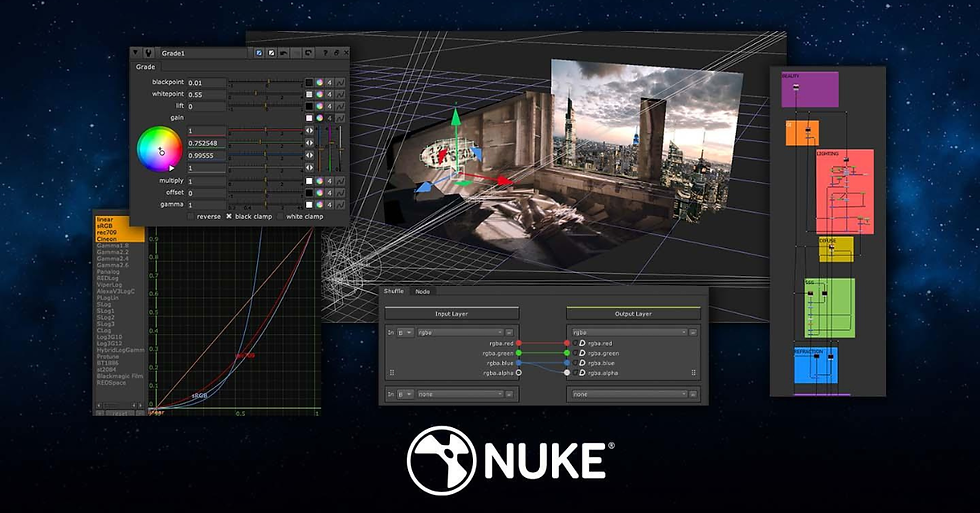
Compositing and post-production tools are essential for adding visual effects, adjusting colour, and finalising the animation. These tools allow animators to integrate different elements seamlessly and polish the final product.
Adobe After Effects
Best for: Motion graphics and compositing
With a name that’s on the nose, Adobe After Effects is a go-to application for motion graphics, visual effects, and compositing. It is widely used in advertising, film, and digital content creation to animate graphics, enhance footage, and build layered visual effects within a flexible timeline-based workflow.
DaVinci Resolve
Best for: Colour grading and editing
DaVinci Resolve is a comprehensive post-production suite built around professional colour grading, editing, and audio finishing. Used in film and television production for its industry-leading colour tools, while also offering a full editing workflow in a single integrated platform.
Autodesk Flame
Best for: Advanced finishing
Autodesk Flame is a high-end finishing and visual effects solution used extensively in film and television post-production. It is designed for complex compositing, final image polishing, and high-precision finishing work where quality control is critical.
Fusion 19 (by Blackmagic Design)
Best for: Free professional compositing
Free for both commercial and production use, Fusion 19 is a powerful option for budget-conscious studios. It is designed for node-based compositing, making it well-suited for integrating visual effects, layering elements, and refining final shots in post-production workflows.
HitFilm Pro
Best for: Beginner-friendly VFX workflows
HitFilm Pro combines video editing and visual effects tools in one platform, making it accessible for beginners exploring post-production. It includes features like layering, chroma keying, and built-in effects for creating polished visual sequences without a steep learning curve.
Natron
Best for: Open-source compositing
Natron is an open-source compositing software that offers professional node-based workflows similar to high-end industry tools. It provides a flexible and cost-free alternative for artists working on visual effects and compositing projects.
Nuke
Best for: High-end film compositing
Nuke is a node-based compositing software widely used in high-end film and television production. Known for its advanced control over complex visual effects shots, making it a standard tool in major studio pipelines for feature films and VFX-heavy projects.
#7. 7 Project Management Tools

Project management tools are important for keeping animation projects organised, on schedule, and within budget.
They’re used before, during, and even after a project; these tools help teams collaborate effectively, track progress, and manage resources throughout an animation pipeline.
These animation project management tools for studios help streamline processes and ensure all parts of the animation pipeline work seamlessly.
Asana
Best for: Team coordination
Asana is a popular project management tool that helps teams organise, track, and delegate work across different industries. It supports task assignment, timelines, and progress tracking, making it easier to keep projects aligned and on schedule.
Flow Production Tracking (formerly ShotGrid)
Best for: Studio production tracking
Flow Production Tracking (formerly ShotGrid) is built specifically for VFX, animation, and game studios to manage production workflows. It helps teams track assets, shots, reviews, and approvals, ensuring smooth coordination across complex production pipelines.
ClickUp
Best for: Flexible workflow management
ClickUp is an all-in-one productivity platform that combines tasks, documents, whiteboards, and spreadsheets in one space. Its flexibility allows teams to customise workflows to suit different project styles, from creative production to structured planning.
FTrack
Best for: Media production management
FTrack is a production tracking platform designed for film, animation, and VFX workflows. It helps teams manage tasks, track progress, and collaborate efficiently across different stages of media production.
Notion
Best for: Documentation and collaboration
Notion is an all-in-one workspace for note-taking, task management, and team collaboration. Allowing users to build structured documentation systems and even publish pages, making it useful for both internal organisation and external sharing.
Trello
Best for: Visual task management
Trello is a Kanban-style project management and productivity tool developed by Atlassian that uses boards, lists, and cards to help you and your team organise tasks, track progress, and collaborate in real-time.
Featured Tool: TESSR
Best for: Animation reviews and approvals
Project management software made for creatives like animators and designers. TESSR offers annotation tools, centralised review systems, and insightful data for your creative project management needs.
TESSR is built to help animators, artists, and creatives streamline their animation workflows. Our animation workflow software features support for project and people management with a visual-first experience, making teamwork feel friendlier, more effective, and engaging.
You can easily give and receive feedback or approvals through drawn, written, or frame-accurate comments, minimising miscommunication and keeping the focus on progress.
Beyond supporting contextual feedback, we built the app to strengthen teamwork by helping leaders distribute scenes evenly among team members, preventing burnout and promoting a balanced workload.
Frequently Asked Questions (FAQs)
What are the best tools for beginners and industry professionals?
Tools | Why It’s Good |
Blender | For beginners:
For professionals:
|
Adobe Animate | For beginners:
For professionals:
|
Toon Boom Harmony |
Beginners are recommended to use Harmony Essentials, while professional studios can consider Harmony Premium. |
What are the best tools for 2D and 3D animation projects?
Whether you're working in 2D or 3D animation, these tools are built to support your creative process at every stage.
Tools | Plan | Why It’s Good |
Adobe Animate (2D) | Subscription-based(Adobe Creative Cloud) | Used in broadcast TV, web animation, and interactive media; supports ActionScript and HTML5 Canvas export |
Moho Pro (2D) | One-time purchase (Perpetual license) | Suitable for advanced bone-rigging systems |
Blender (3D) | Free (Open-source) | An all-in-one 3D software covering modelling, rigging, animation, rendering, and compositing |
Houdini (3D) |
| Excels at complex simulations and high-end visual effects, a staple in film and game production pipelines |
What are some of the best animation tools for freelancers?
Freelance animators need tools that are flexible, intuitive, and easy to manage by themselves. Here are some of the best animation software options to consider.
Tools | Why It’s Good |
Adobe Creative Cloud (2D) | Covers the full creative pipeline from design to animation and compositing, using industry-standard tools and workflows widely adopted by studios globally |
Trello (Project Management) | Simple, visual interface that makes it easy to organise tasks, track progress, and manage workflows at a glance |
Clip Studio Paint (2D) | Strong drawing and illustration tools tailored for animation, especially useful for frame-by-frame and stylised 2D work |
DaVinci Resolve (Post-Production Suite) | Professional-grade editing, colour grading, and post-production tools in one platform, widely used in film and animation pipelines |
TESSR (Project Management) | Built specifically for creative teams, helping animators and project managers streamline workflows, collaboration, and production tracking in one place |
Author Bio
The TESSR Editorial Team is a collective of creatives and project management practitioners who enjoy sharing real-life experience on project management, creative workflows, and well-being in the creative industries. The team wants to help creative leaders, project managers, and individuals in animation, design, and creative studios understand the benefits of project management. So, creatives can all create with more freedom and, together, build a more sustainable creative culture.
Check out their LinkedIn page here.


Comments